heterograph: basics
overview
Heterograph is a Python graph library designed to capture model descriptions, from neural network architectures to software programs. It provides a uniform program abstraction for both analysis and manipulation.
Built on top of graph-tool, a scalable and fast graph library with a core engine written in C++, Heterograph extends graph-tool by adding several unique features:
Persistent Identifiers: Ensures that vertices and edges retain their identifiers across sessions.
Custom Neighbor Ordering: Allows ordering between input and output neighbors of any vertex.
Read-Only Graphs: Enables the creation of graphs that cannot be modified, ensuring data integrity.
Property Maps: Captures arbitrary data for graphs, vertices, and edges, enhancing the ability to store and retrieve complex information.
Graph Styles: Facilitates the creation of richly styled graphs for better visualization and interpretation.
Web App Visualization: Provides tools for visualizing graphs within a web application, making it easier to explore and understand graph structures interactively.
creating a graph
To create a graph, we import heterograph module and instantiate HGraph class as follows:
[1]:
from heterograph import *
g = HGraph() # create HGraph
vertices
Each vertex in HGraph is identified by an integer. It remains persistent and unique within the graph, even if other parts of the graph are changed. Therefore, the vertex ID can be safely used as an index.
adding vertices
To add one or more vertices, we use add_vx and specify n - the number of vertices to add:
if
n == 1(or no argument is specified): one vertex is added, returning the vertex ID as an integer.if
n > 1:nvertices are added, returning a list of corresponding vertex IDs.
[2]:
g.add_vx() # adds one vertex, identified by ID 0
[2]:
0
[3]:
g.add_vx(4) # adds two vertices, identified by IDs 1 to 3
[3]:
[1, 2, 3, 4]
removing vertices
To remove one or more vertices, we use rm_vx(vs, verify=True) and specify either the vertex ID (int) or a list of vertex IDs to be removed. By default, the verify parameter is set to True, meaning that any vertex ID not found raises an exception. Otherwise, any vertex not found is ignored.
[4]:
g.rm_vx(0) # remove vertex 0
[5]:
g.rm_vx([3,4]) # remove vertices 3 and 4
listing vertices
To retrieve the list of available vertices, we use the vertices property.
[6]:
g.vertices
[6]:
[1, 2]
checking vertices
To verify whether a vertex (or a set of vertices) exists, we utilize the check_vx(vs, verify=False) method. By default, it returns True if all specified vertices exist and False otherwise. However, when the verify parameter is set to True, it raises an exception if any vertex is not found. This is particularly useful in pre-condition checks.
[7]:
g.check_vx(1)
[7]:
True
[8]:
g.check_vx([0, 1])
[8]:
False
[9]:
try:
   g.check_vx([0, 1], verify=True)
except:
    print("pre-check failed!")
pre-check failed!
edges
An edge connects a source vertex s to a target vertex t and is identified by the tuple (s, t), where s and t represent the vertex IDs. The following types of edges are not supported by HGraph:
self-loop edges, i.e.,
(vx, vx), where an edge has the same source and target vertex.two edges with the same source and target. Hence,
(s, t)uniquely identifies an edge.
adding edges
To add one or more edges, we use the add_edge(s, t) method:
both
sandtcan be either integers or lists of integers denoting vertex IDs.a cartesian product is performed if either
sortare lists.ignores if edge is a self-loop
(s, s)or if edge already existsreturns a list of added edge IDs
[10]:
g=HGraph()
g.add_vx(5)
g.add_edge(0, [1,2])
[10]:
[(0, 1), (0, 2)]
[11]:
g.add_edge([1,2], 3)
[11]:
[(1, 3), (2, 3)]
[12]:
g.add_edge(3, 4)
[12]:
[(3, 4)]
[13]:
g.add_edge(3, 3) # ignores if self-loop
[13]:
[]
[14]:
g.add_edge(3, 4) # ignores if adding an existing edge
[14]:
[]
removing edges
To remove one or more edge, we use rm_edge(edge, verify=True) and specify either an edge ID (tuple (s, t)) or a list of edge IDs to be removed. By default, the verify parameter is set to True, meaning that any edge ID not found raises an exception. Otherwise, any edge not found is ignored.
[15]:
g.rm_edge((3, 4))
listing edges
To retrieve the list of available edges, we use the edges property.
[16]:
g.edges
[16]:
[(0, 1), (0, 2), (1, 3), (2, 3)]
checking edges
To verify whether an edge (or a set of edges) exists, we utilize the check_edge(vs, verify=False) method. By default, it returns True if all specified edges exist and False otherwise. However, when the verify parameter is set to True, it raises an exception if any edge is not found. This is particularly useful in pre-condition checks.
[17]:
g.check_edge((3, 4))
[17]:
False
neighbours
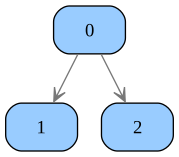
To return adjacent vertices of a vertex vx, use the in_vx(vx) method for input vertices (vertices that have an edge pointing to vx) and the out_vx(vx) method for output vertices (vertices that vx points to).
[18]:
g=HGraph()
g.add_vx(3)
g.add_edge(0, [1,2])
[18]:
[(0, 1), (0, 2)]
[19]:
g.in_vx(1)
[19]:
[0]
[20]:
g.out_vx(0)
[20]:
[1, 2]
visualizing a graph
To visualize a graph, use the view(host='0.0.0.0', port='8888') method. This launches a web app that can be accessed at http://localhost:8888. The web app allows to zoom and pan the graph for detailed examination. When this method is invoked inside a Jupyter Notebook, the graph is displayed directly within the notebook. More details about visualisation can be found here.
[21]:
g.view()